

Three tasks, not "the future of AI"
At a regional real estate forum we treated AI agents as a tool rather than a topic: we took three concrete routines of a real estate agent and ran them live on stage. This article is the same walkthrough, in a form you can come back to.
One disclaimer up front: every name, address, price and document in the examples below is demo data, not a real client deal. What is shown is the mechanics, not anyone's private information.
Why this is an agent, not a chatbot
The most common objection sounds like this: "I tried a neural network, it wrote a decent listing text." It did — and that was the end of it: you still moved the text into your CRM by hand.
An AI agent has a workspace of its own — roughly what a computer is to an employee: files, tools, API access to your services. So the output of its work is records in your CRM, finished documents and processed photos, not a chat message you still have to copy somewhere.
Case 1. Running deals in the CRM
The path from an incoming enquiry to a booked viewing looks like this:
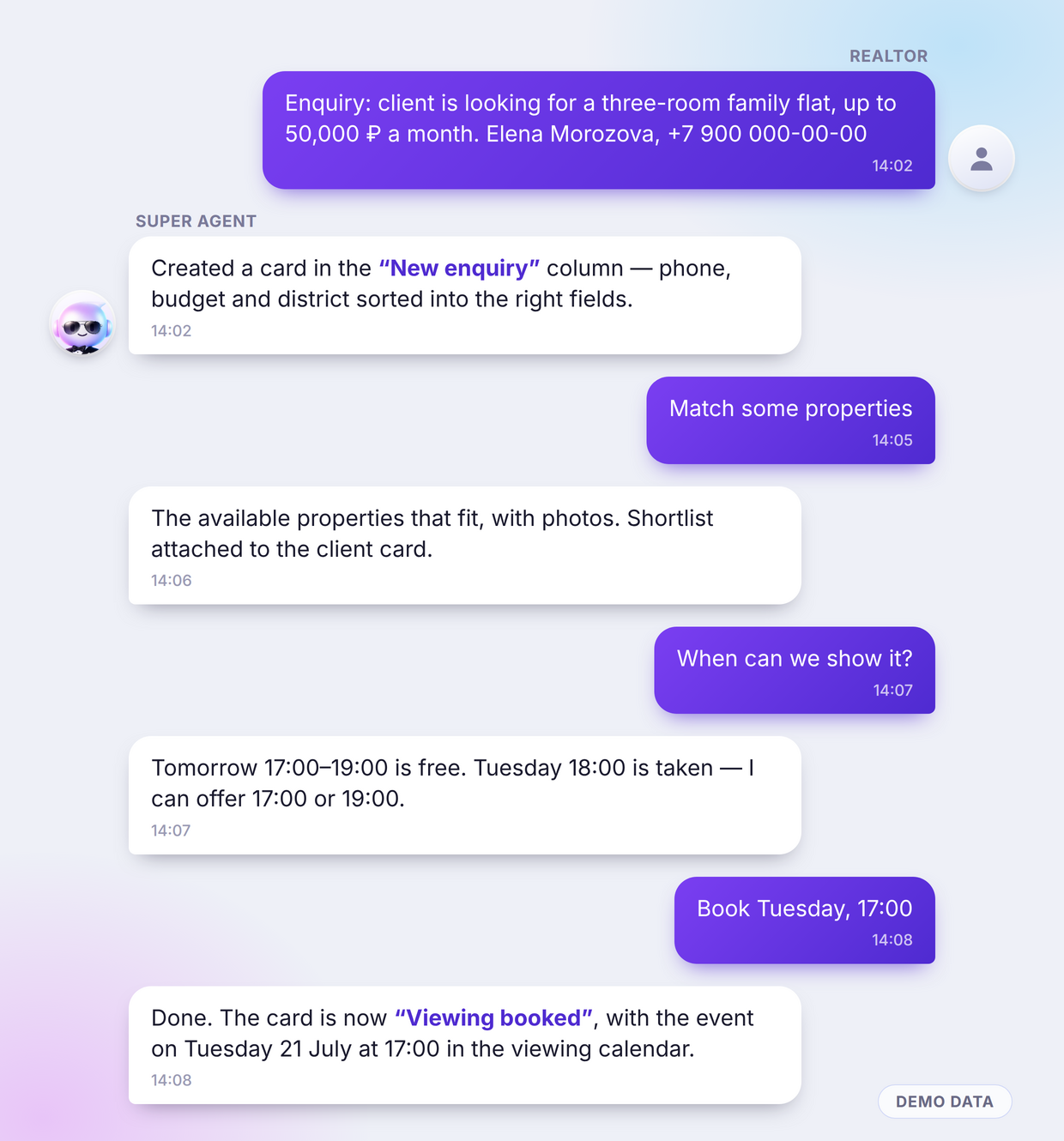
- You state the enquiry in words. "Enquiry: client is looking for a three-room family flat, up to 50,000 ₽ a month." The agent creates a card in the "New enquiry" column, with phone, budget and district in the right fields.
- The agent matches properties. It looks through the base, picks available options with photos and prepares a shortlist for the client.
- It works out free slots. It checks the viewing calendar and answers like a person: "Tomorrow 17:00–19:00 is free. Tuesday 18:00 is taken — I can offer 17:00 or 19:00."
- It books the viewing. One "book it" from you and the card moves to "Viewing booked", with the event added to the calendar.
Four messages — and not a single click inside the CRM by hand.
And this is the same demo CRM from the inside — three screens the agent changes on its own, with no clicks from the realtor.

The agent created the card in the "New enquiry" column itself, straight from a chat message. From there it travels down the funnel: options sent, viewing booked, viewing held, deal closed. The board is a Russian-language demo; clients and amounts on it are demo data.

That is the booked slot: Tuesday, 18:00. Which is why the agent offered 17:00 in the chat — it works the free window out from here instead of asking you.
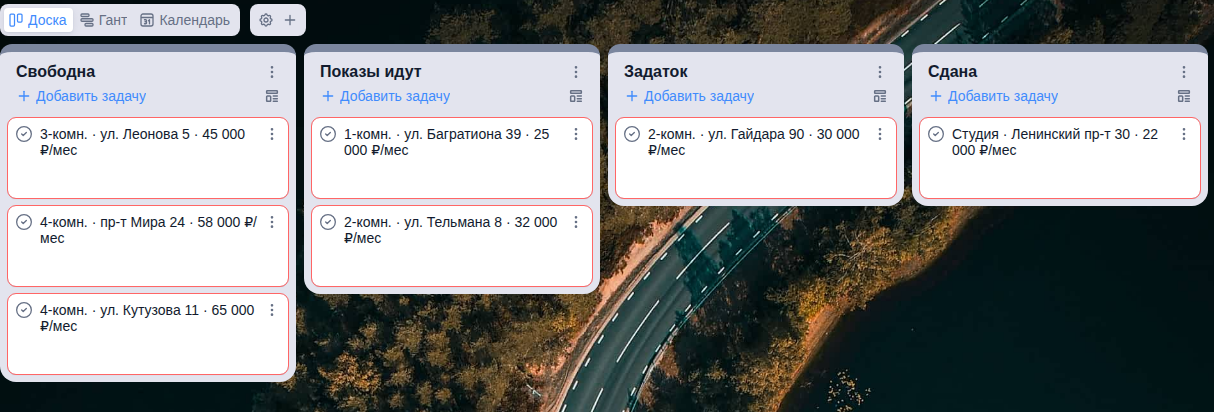
The second board holds the properties. Book a viewing and the flat moves from "Available" to "Viewings running" — the agent moves the status, not the realtor at the end of the day.
What it takes: an open API on your CRM. That is the only technical requirement, and it is also the first question to ask your CRM vendor before you start.
The practical point: the most expensive routine in this job is not negotiation — it is moving information between your head, your phone and the CRM. That is the layer an agent removes first.
Case 2. Listing photos
Here is why listings sit for weeks: the owner sends phone shots taken while they still live in the flat. An unmade bed, boxes, things on the floor. You cannot publish that, and going back to reshoot costs half a day.
The agent brings the frame to a publishable state in about half a minute: it removes clutter and corrects geometry and light. The layout, the windows and the real dimensions of the room stay where they were — this is photo processing, not painting a flat that doesn't exist.
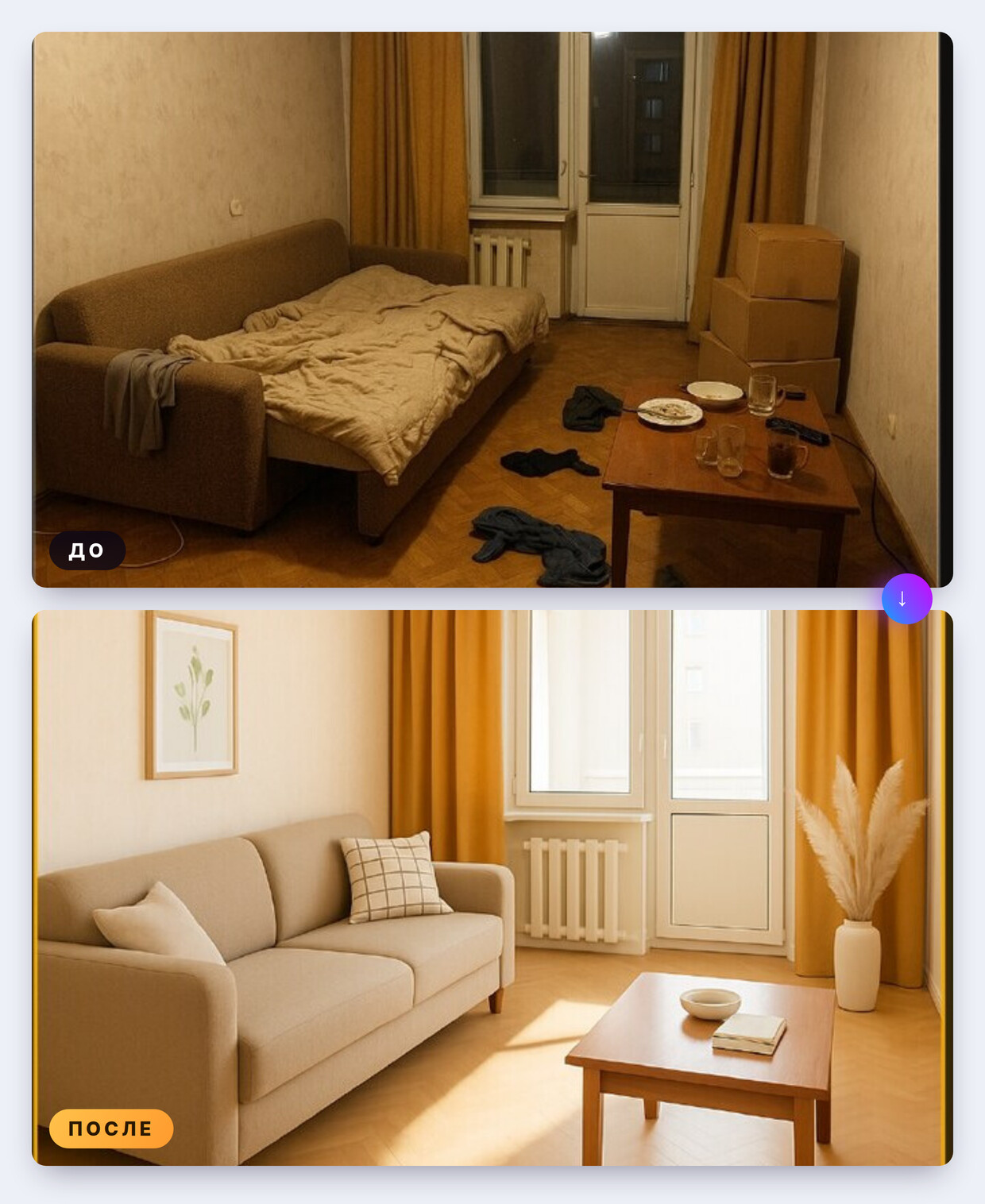
The layout, windows and room dimensions in the right frame are the same as in the left one.
The practical point: honesty matters here. Tidying up a photo is fine. Painting in a renovation that isn't there is how you lose a client's trust at the first viewing.
Case 3. The deal paperwork
A tenancy agreement, a handover act with an inventory, a receipt for the money. All filled in by hand, with the same data repeated dozens of times: names, passport details, address, amounts, dates — and the amounts spelled out in words.
It works like this: you hand the agent your own contract template once. It parses the template and finds every field to fill — in the demo example there were 47 of them. After that you pass the deal data in a single message and get the finished set back in DOCX and PDF: the agreement, the act with the inventory and the receipt. Amounts in words, details and dates all consistent across documents.
The passport details in the demo example are fictional.
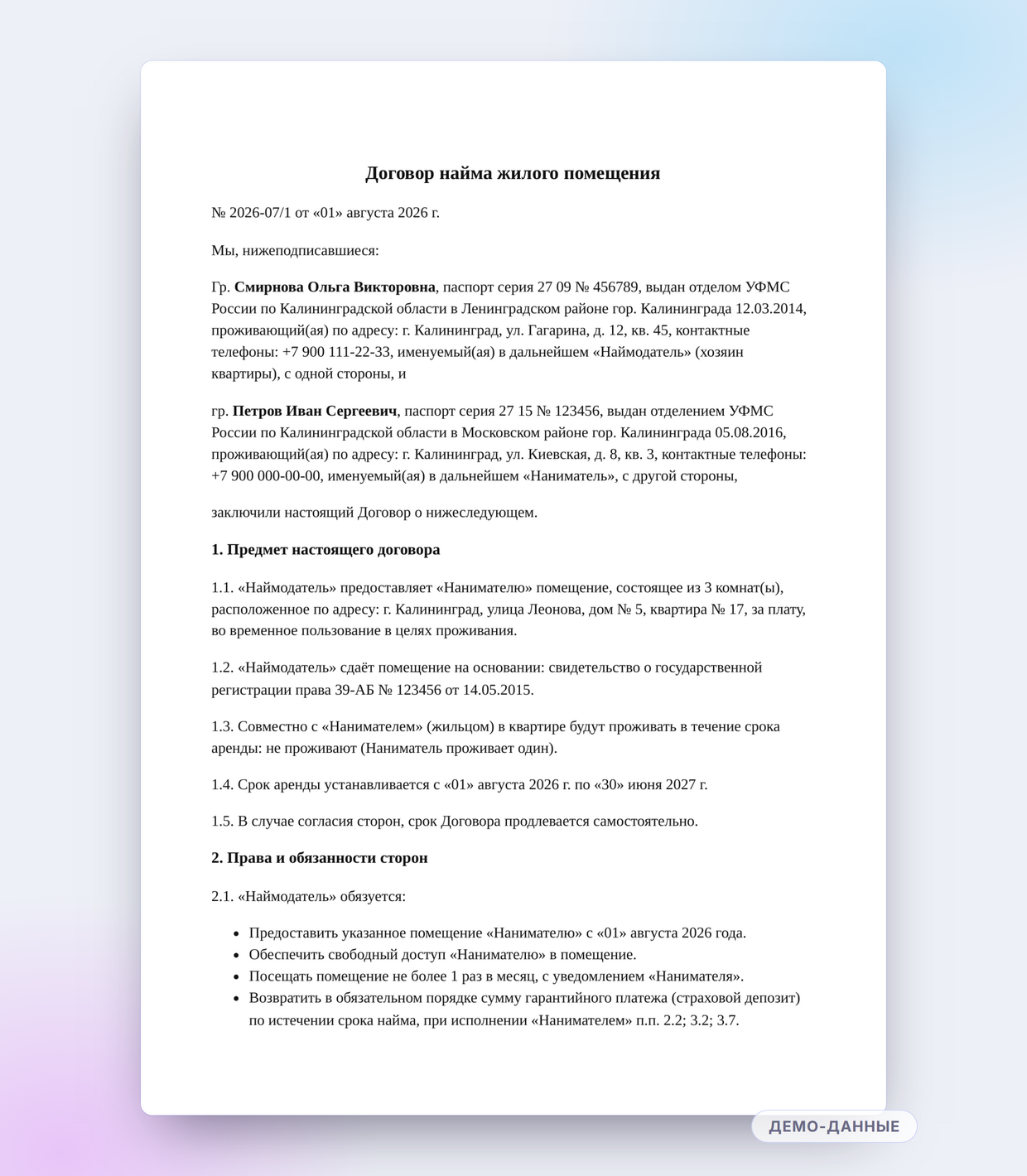
One page of the set. Every detail in the frame is demo data.
The practical point: this is the easiest place to start. The template already exists, the result can be checked in a minute, and the saving shows up on the very first deal.
What else the same agent does
It is one and the same tool — only the wording of the task changes:
- A landing page for a property — from one message, with a gallery, description and a viewing form.
- Short videos for social media — from photos and vertical footage of a viewing, with subtitles.
- Price monitoring for your district and property type, with a digest and outliers highlighted.
- Recurring exports and reports — from templates, with no manual copy-paste.
The full picture is in the Super Agent overview: its own workspace, memory across conversations, file handling and a rollback command.
When personal data enters the workflow
The moment passports and contracts are involved, "where does the data live" stops being a theoretical question. There is a self-hosted option: the agent and the model run on the agency's own infrastructure and nothing leaves its perimeter. Settle this before you scale, not after the process is already running.
How to start this week
- Pick one routine — the one that eats more than an hour a week. One, not all of them.
- Run it on a single property. Take a real but non-urgent listing and time yourself before and after — that is your only honest metric.
- Ask your CRM vendor whether the API is open. The answer decides whether the agent stays a separate helper or becomes part of the agency's workflow.
- Settle the data question before scaling.
Try it
You can give the agent its first task right now — in Telegram or in the Max messenger. The trial needs no card; after that it is pay for the work actually done.
Read next
Frequently asked questions
- What does an AI agent actually do for a real estate agent?
- Three routines: it runs deals in your CRM (creates cards, matches properties, books viewings), prepares listing photos and assembles the deal paperwork from your own template. You state the task in plain words in a messenger.
- Do I need to write code or configure scenarios?
- No. You write the task to the agent in plain words, the way you would to an assistant. Scripts, buttons and knowledge bases belong to classic chatbots, not to an agent.
- Which CRM does this work with?
- Any CRM with an open API. That is the only technical requirement: if your CRM can read and write data over an API, the agent can maintain cards, the viewing calendar and deal stages in it.
- Can the agent be trusted with clients' personal data?
- For personal data there is a self-hosted option: the agent and the model run on the agency's own infrastructure and nothing leaves its perimeter. Settle this before you scale the process, not after.
- Does the agent paint in a renovation that isn't there?
- No, and you shouldn't want it to. The agent removes clutter and corrects light and geometry — the layout, windows and real dimensions stay untouched. An invented renovation falls apart at the first viewing.