
Feature overview
Lite.panteo.ai supports Google Docs as a data source for AI agents.
Agents can read documents, search through them, and use the content to answer user questions.
This is suitable for policies, instructions, onboarding materials, sales documents, and internal knowledge bases.
How it works
- You add a Google Docs link as a data source
- The platform indexes and structures the document content
- The agent retrieves relevant fragments during conversations
- When the document is updated, the agent uses the latest version automatically
No manual exports or copy-paste required.
Common use cases
Internal documentation
Employees ask questions about policies and procedures in a conversational format.
Sales and customer support
Proposals, service descriptions, and FAQs stored in Google Docs become a single source of truth.
Training and onboarding
Agents help users navigate large documents without reading them end-to-end.
Quickstart: connect Google Docs
- Open the required document in Google Docs
- Enable link access with read permissions
- Copy the document link
- In Lite.panteo.ai, open agent settings → Data sources
- Add a new source and paste the Google Docs link
- Save settings and start the agent
The agent is now ready to answer questions based on the document.
Advanced settings
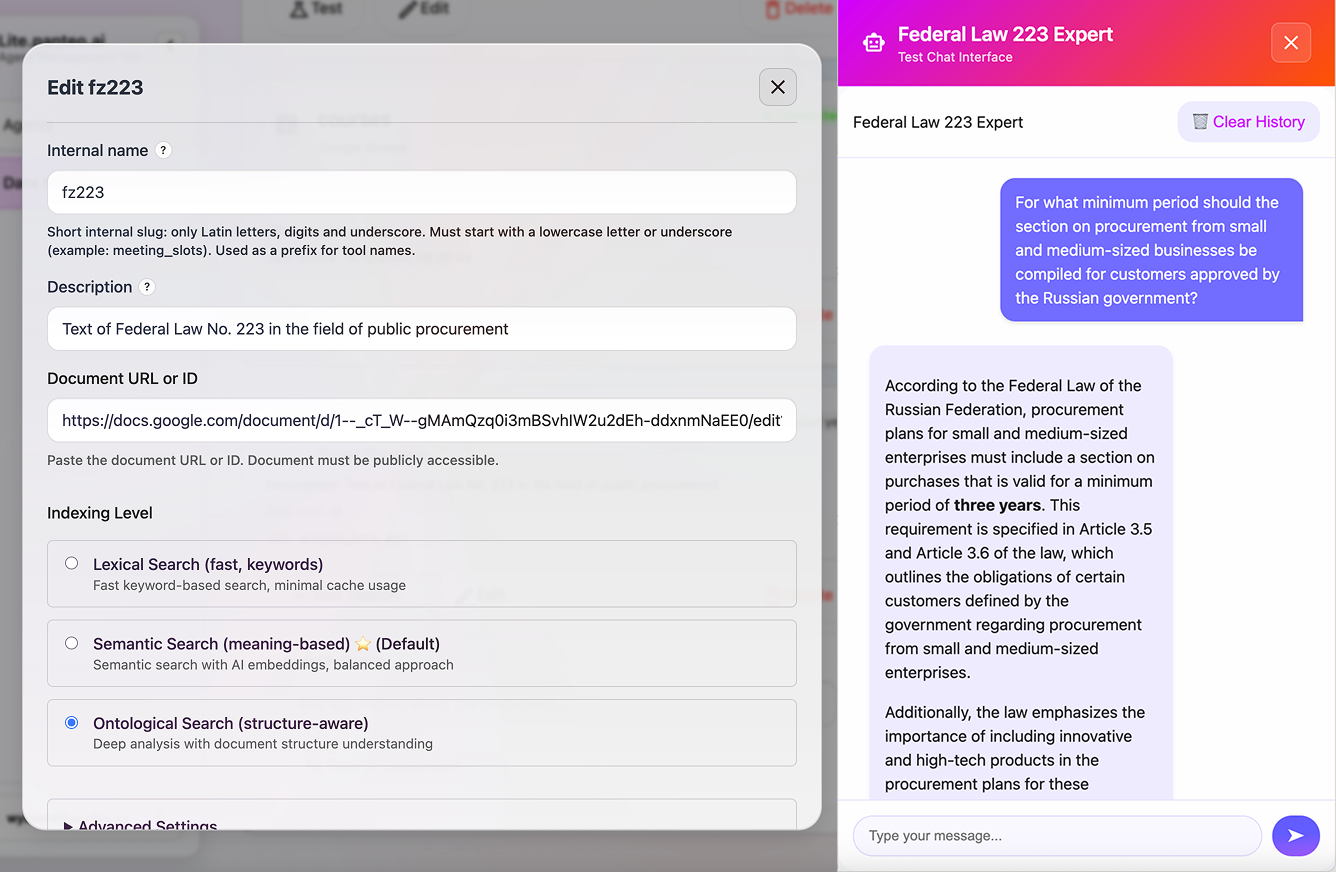
🔎 Indexing levels and search types
Lite.panteo.ai offers multiple indexing levels that define how the agent retrieves information, the depth of document understanding, and credit consumption.
Lexical Search (fast, keywords)
Fast keyword-based search, minimal cache usage.
- Suitable for small documents
- Lowest computational and credit cost
- No semantic or structural understanding
Semantic Search (meaning-based) ~ (Default)
Semantic search with AI embeddings, balanced approach.
- Uses vector representations to capture meaning
- Works well for instructions, policies, and FAQs
- ⚠️ Indexing consumes credits at this level
- Recommended for most business use cases
Ontological Search (structure-aware)
Deep analysis with document structure understanding.
- Considers sections, clauses, and hierarchical relations
- Uses 2× more credits for indexing compared to Semantic Search
- Each search query consumes 2× credits
- Best for legal documents and complex regulations
Additional parameters
Chunk size
Controls how the document is split into fragments.
- Smaller chunks improve precision
- Larger chunks provide more context
Chunk overlap
Preserves continuity between adjacent fragments.
Recommended for structured and long documents.
Search agent iterations
Defines how many refinement steps are performed before generating the final answer.
Usage example: regulatory document
User query:
What is the minimum period for forming the procurement section related to small and medium-sized enterprises for government-approved customers?
Agent response:
The minimum period for forming the procurement section related to small and medium-sized enterprises for customers approved by the Government of the Russian Federation is at least three years. This requirement is specified in Part 8.2 of Article 3 of the applicable Federal Law.
This scenario uses Ontological Search to ensure structural accuracy and correct legal interpretation.